Email-to-Task Gateway Module
The Email Tasks module allows you to create tasks in Planovik AI by simply sending or forwarding emails to your dedicated personal address. It is a convenient way to capture action items, save important messages, and log tasks directly from your mail client.
Where to configure: Click your profile in the top-right corner of the header → select “Settings” → “Email Tasks” tab (available on Pro and Team plans).
1. How It Works
Section titled “1. How It Works”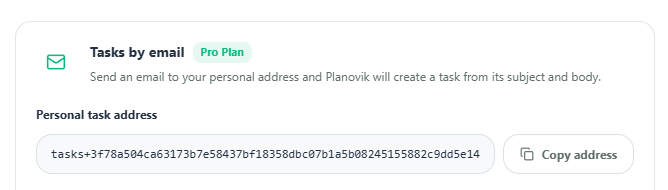
- Personal task address: A unique secure email address. Click “Copy address” to save it or add it to your contacts.
- Workspace for new tasks: Select the target workspace from the dropdown where incoming tasks should be placed, and click “Save workspace”.
- Disable address: You can temporarily deactivate email task creation at any time by clicking “Disable address”.
2. Task Creation Process
Section titled “2. Task Creation Process”- Compose a new email or forward any message to your personal task address.
- The Planovik AI background worker checks for new emails every minute and verifies the sender address.
- The Task Title is created from the email Subject line.
- The Task Description is populated from the email body text (up to 4,000 characters).
- The task is automatically added to the Inbox list of your selected default workspace.
- Thanks to real-time sync, the new task instantly appears across all your open tabs and devices.
3. Security and Technical Limits
Section titled “3. Security and Technical Limits”- Sender Address Verification: The server accepts messages strictly from the email address registered with your Planovik account. Unrecognized sender emails are automatically rejected.
- Unique Address Token: The gateway address uses a secure cryptographic HMAC token tied to your profile.
- Technical Limits:
- Email check interval: 1 minute.
- Maximum email size: up to 5 MB.
- Maximum description length: up to 4,000 characters.
- Rate limit: up to 20 tasks per minute and 300 per day.
4. Plan Availability
Section titled “4. Plan Availability”The personal email gateway feature is available on paid plans (Pro and Team).